Sunday, June 22, 2008

Hacking the Eee PC
April 1st, 2008 by Jes Hall in

* Hardware

How to tweak your Eee PC.

ASUS' diminutive sub-notebook, the Eee PC, has so far exceeded expectations and is sold out virtually everywhere. Its simple interface and wallet-friendly pricing have contributed to making the Eee the most popular gadget this season.

It's in the hands of the power user that the Eee really shines. With hardware support already taken care of, the Eee offers an opportunity for beginning-to-intermediate Linux users to customise themselves a flexible Linux-based tool using the Eee's easy or full desktop mode.

In this article, we take you through tweaking your Eee, although in the interest of preserving your warranty, most of the hacks here are focused on software. The first and most important hack is to read the manual that came with your Eee to make sure you're completely up to date on everything. When you read the manual (because you are going to read it, right?), you'll notice that ASUS mentions the keyboard shortcut Ctrl-Alt-T to launch a terminal. Gaining root on the default Eee install is as simple as issuing the command:

sudo -s

There is no password; any person who can open a terminal is able to gain root.

ASUS' easy mode uses a customised IceWM (www.icewm.org), a standard X11 window manager that's been around for a very long time. It's relatively easy to customise to your liking. The first step is creating a directory for local modifications. Open a terminal using the aforementioned keyboard shortcut, and type:

mkdir ~/.icewm
cp /etc/X11/icewm/* /home/user/.icewm/

This creates a local customisation directory and copies the ASUS IceWM configuration into it, ready for you to modify. As not all of the software that ships with the Eee is accessible through the easy mode launcher, the first useful thing to tweak on the Eee is to add the IceWM panel menu and edit it to add those applications that aren't exposed through the easy mode interface.

To enable the menu, edit ~/.icewm/config, and scroll down to the option named TaskBarShowStartMenu. Change the 0 in the uncommented value to 1, and save the file. You need to restart your Eee for the menu to show up:

# Show 'Start' menu on task bar
# TaskBarShowStartMenu=1 # 0/1
TaskBarShowStartMenu=1

Figure 1. The IceWM Menu, with the Menu File in the Background

To edit the menu, open ~/.icewm/menu in your favourite editor. The menu format is pretty simple, following the syntax:

prog label icon command

where label, icon and command are replaced with the appropriate entries for the application you want to launch. For example, to add an entry that launches Konsole, the KDE terminal emulator, you would create an entry as follows:

prog Konsole konsole konsole

Submenus are described with the following syntax:

menu "Label" {

}

Program entries or further submenus are defined between the curly braces.

The first thing we all thought on using the Eee when we first received it was “the Windows XP theme doesn't look attractive on XP, let alone on Linux. How the heck do we change this abomination?”

You'll be pleased to know that this is extremely simple, now that the menu is enabled. The biggest theme repository for IceWM is at themes.freshmeat.net/browse/925, with hundreds of themes from which to choose. Once you've downloaded a theme, create the folder ~/.icewm/themes, and extract the theme to that folder. It will now be selectable from the IceWM menu under Settings→Themes.

Figure 2. A broad selection of attractive themes are available for IceWM.

You can find a wide range of other customisations by reading the comments in the ~/.icewm/preferences file. Some notable ones are showing the workspace switcher on the panel and adding a CPU meter. Traditional window manager settings, such as focus model, are available as well.

With a built-in Webcam, it's a shame that the Eee PC didn't ship with the Linux beta of Skype that allows video calling. It is, however, easy to install by hand. Navigate to www.skype.com/download/skype/linux, and elect to download not the current stable version, but the beta. When it asks you to select your distribution, download the package for Debian Etch. Once you've downloaded it to disk, open a terminal and navigate to where the file was saved. Type the following to install the package:

dpkg -i skype-debian_2.0.0.27-1_i386.deb

The version number of the package may have changed since the time of this writing. As this upgrades the version of Skype already installed, the Skype launcher will launch the new version.


Figure 3. Some Linux mascots take time out from their busy schedule to test video calling for us.

During the course of adding applications to the menu, the observant will notice that the Eee ships with most of KDE installed. During its development phase, the Eee exposed an option to enable a full desktop mode with a complete KDE 3.4 desktop. The most elegant solution for enabling the full desktop is to install a package that does the configuration for you from wiki.eeeuser.com/howto:getkde. This package essentially downloads the packages for kicker and ksmserver, and modifies the ASUS startup scripts. It adds an option to log in to full desktop mode from the easy mode shutdown dialog. To get back into easy mode, there is an option in the K menu. This page also details the manual methods for enabling full desktop mode.


Figure 4. A Full KDE Desktop

Adding more software from a Xandros or Debian repository is the next logical step in customising the operating system that ships with the Eee. For us, the Eee requires only the addition of Emacs and Subversion to be a great portable hacking tool. You can use any Debian Sarge repository or a Xandros 4.0 one, as shown below. There are a few caveats though. As the Xandros running on the Eee is heavily customised by ASUS, it's very easy to end up with the Eee in an unbootable state if you allow apt to upgrade too much. Although it's not a complete solution, apt pinning can be used to ensure that the ASUS repository always takes priority for a package.

Add your repository to /etc/apt/source.list with your favourite text editor as root, either your local Debian Sarge repository or the Xandros one below:

deb http://xnv4.xandros.com/4.0/pkg xandros4.0-xn main
↪contrib non-free

Then, create the file /etc/apt/preferences, and add the lines:

Package: *
Pin: origin update.eepc.asus.com
Pin-Priority: 999

As apt sources default to a lower priority, this ensures that packages from the ASUS repository are prioritised. It's still possible though to break your Eee by installing packages willy-nilly. If it looks as though an action is going to upgrade a large number of packages, especially if it looks like what it's upgrading is all of KDE, cancel the change.

This limitation can be extremely frustrating if you want to make more drastic changes to your Eee PC's installed packages. Another option is to install a generic Linux distribution on the Eee. eeeXubuntu (wiki.eeeuser.com/ubuntu:eeexubuntu:home) is a version of the Xubuntu 7.10 distribution with Eee-specific drivers integrated and tweaks for low-resolution displays. It's an excellent choice if you want a more modern distribution on your Eee but would prefer not to compile the drivers from ASUS by hand.

The wiki page has in-depth instructions on how to create a bootable USB stick for your Eee. Boot your Eee from the USB stick by pressing Esc at boot time to get to the boot options menu, and from the GRUB bootloader, select the option to load eeeXubuntu with Eee-specific drivers and fixes. From there, it's all very familiar. Click the Install icon on the desktop once the live CD loads, and navigate your way through the Ubuntu installer.

If your Eee has 512MB or more of memory, you probably can get away with not creating a swap partition. In our testing, running Firefox, Pidgin and Thunderbird, the Eee was using approximately 300MB of memory, minus buffers/caching. If your Eee has 1,024MB or more of memory, you'll never notice the difference.

Opting out of swap, however, does have the side effect that hibernate to disk is disabled. The Eee does have suspend to RAM support under eeeXubuntu, but this level of suspend does consume a fair amount of battery. Leave your Eee suspended for 24 hours, and expect to see your battery down to half when you resume it.


Figure 5. eeeXubuntu is a customised Xubuntu for the Eee PC.

The simplest and most rewarding Eee hardware mod is upgrading the built-in memory. Note: this mod requires removing a sticker that claims its removal will void your warranty. According to a public statement by ASUS at usa.asus.com/news_show.aspx?id=9223, this is not the case, and upgrading your memory will not void the warranty on your Eee. However, Linux Journal takes no responsibility for any damages to your Eee or loss of warranty incurred by following this advice.

The Eee PC takes a single SODIMM of DDR2667, in either 512, 1,024 or 2,048MB. That's right, the Eee PC can be upgraded to an impressive 2GB of memory.

To upgrade the memory on your Eee, you need a set of small electronics screwdrivers and a clean surface that's safe for handling static-sensitive equipment.

If you haven't installed memory before, Linux Journal recommends you enlist the help of a professional or a hardware-minded friend.

Ensure that the Eee is shut down (not suspended), and unplug it from the power. Turn the Eee upside down and remove the battery.

Using a very small Phillips screwdriver, remove the two screws in the memory panel. One is covered by a sticker that will tear easily if you simply remove the screw as though the sticker was not there.

Use a small flatblade screwdriver very carefully or a fingernail to lever up the memory compartment. Put the memory compartment cover and the screws to one side.

To remove the memory that shipped with your Eee, carefully use a pair of small screwdrivers or your fingers to lever the clips outward. The memory module will pop upward when it is free of the clips. Remove the module from the slot, taking care to touch only the very outside edges of the module.


Figure 6. Removing the Module

Place the module aside in a static-safe place, and remove the new module from its packaging. Place it in the slot at a 45-degree angle, as shown in Figure 7, taking care that the notch on the module matches the key on the slot. When the module's base is securely slotted in, it can be carefully lowered into position by pushing the top corners of the module backward with your fingers, so that it lies flat against the Eee's motherboard. The metal clips should snap over the sides of the module with a satisfying click when it's properly in place. Once the memory is secure, replace the memory compartment cover and ensure that all sides have clicked down.

Figure 7. Installing the New Module

If you're anything like us, at this point, you'll hunt all over the desk searching for the screws only to find them 20 minutes later stuck to the magnetic closure on the MacBook. Replace the two screws to secure the memory compartment cover, and insert the battery again. It's always a good idea to run memtest86 over any new memory you install, which is an option from any recent Ubuntu live CD or the eeeXubuntu bootable USB stick if you made one earlier.

It's pretty easy to see how the Eee has taken the personal computer market by storm. It's cheap, friendly and oh-so-very hackable, with something for everyone. There are myriad other hacks not covered here, from installing Linux distributions and adding the drivers yourself to soldering additional gadgets to the motherboard. In fact, that's what we're off to do right after we submit this article—solder a mutilated Bluetooth dongle to the motherboard, as now we won't get in trouble if we break it.

Have fun hacking your Eee, but remember—installing Windows is cruel to Eee PCs and not endorsed by Linux Journal!

Jes Hall is a Linux Technical Specialist and KDE developer from New Zealand. She's passionate about helping open-source software bring life-changing information and tools to those who would otherwise not have them.

Sunday, June 15, 2008

Linux for Suits - Why an iPhone When We Can Make Our Own Open Phone?


'm writing this in the aftermath of the 2007 Consumer Electronics Show. I attend CES every year, because it's always a treasure trove of interesting Linux stories and use cases (a few of which appear in the UpFront section of LJ this month), and also because it's always fun to see what's happening with a large old industry that's changing a lot more slowly than the annual hype suggests.

Many consumer electronics “revolutions” aren't. Such will likely be case this year with the arrival of Apple's new iPhone. I don't know if scheduling MacWorld and CES for the same week happened by accident or intent, but the effect was predictable: Steve Jobs' customarily charismatic and news-packed opening keynote at MacWorld upstaged all of CES—a tradeshow exceeded in size only by Europe's CeBIT.

The biggest news in Steve Jobs' speech was the iPhone. He called it “a revolutionary product...that changes everything”. He said it would cause a revolution on the scale of the Macintosh in 1984 and the iPod in 2001. He even said the iPhone qualified as not one but “three revolutionary products”. These were 1) “a wide-screen iPod with touch controls”, 2) “a revolutionary mobile phone” and 3) “a breakthrough Internet communications device”. He contrasted it with “smartphones”, such as the Trio, Blackberry, Nokia E62 and Moto Q, all of which feature keyboards that “are there whether you want them or not”.

The iPhone is faced with a large, sharp color screen and a patented pointing system called MultiTouch that lets you use multiple fingers to do all kinds of stuff. (Except, of course, punching phone numbers without looking at them, because all the numbers are displayed behind a layer of clear tactile camouflage.) In the Apple tradition, controls are minimal; there's a single button on the front and few others elsewhere.

At the top of techie conversation at CES was news that the phone would run on Apple's BSD-based OS X and support “desktop class” applications. That claim, and the one about iPhone being a “revolutionary Internet communications device”, fueled hope that Apple would help break the cell-phone industry out of the phone-maker/carrier silos that have trapped customers inside and kept independent developers outside for the duration. In a post on the Linux Journal Web site, I wrote:

Knock what's closed about the iPhone all you want; it's still a computer with a mike, a screen, a speaker and a pile of other input and output openings that invite developments of many kinds. That's why I think iPhone is going make the cell-phone market a lot bigger. It will encourage participation by developers and customers that have until now been forced to cope with far less than they've wanted from the cell-phone industry. And that includes all the legacy cell-phone players with which Apple now partners or competes.

I should have known better. In fact, I did, but ignored my inner cynic.

Back in 1997, when Steve Jobs returned to Apple after a long hiatus, one of his first moves was to kill off clones of the company's hardware. In the midst of the outcry that followed, I wrote this to Dave Winer, who published it on his own site (www.scripting.com/davenet/stories/DocSearlsonSteveJobs.html):

So Steve Jobs just shot the cloners in the head, indirectly doing the same to the growing percentage of Mac users who preferred cloned Mac systems to Apple's own. So his message to everybody was no different than it was at Day One: all I want from the rest of you is your money and your appreciation for my Art.

It was a nasty move, but bless his ass: Steve's Art has always been first class, and priced accordingly. There was nothing ordinary about it. The Mac “ecosystem” Steve talks about is one that rises from that Art, not from market demand or other more obvious forces. And that Art has no more to do with developers, customers and users than Van Gogh's has to do with Sotheby's, Christie's and art collectors.

See, Steve is an elitist and an innovator, and damn good at both. His greatest achievements are novel works of beauty and style. The Apple I and II were Works of Woz; but Lisa, Macintosh, NeXT and Pixar were all Works of Jobs. Regardless of their market impact (which in the cases of Lisa and NeXT were disappointing), all four were remarkable artistic achievements. They were also inventions intended to mother necessity—and reasonably so. That's how all radical innovations work. (Less forward marketers, including Bill Gates, wait for necessity to mother invention, and the best of those invent and implement beautifully, even though that beauty is rarely appreciated.)

To Steve, clones are the drag of the ordinary on the innovative. All that crap about cloners not sharing the cost of R&D is just rationalization. Steve puts enormous value on the engines of innovation. Killing off the cloners just eliminates a drag on his own R&D, as well as a way to reposition Apple as something closer to what he would have made the company if he had been in charge through the intervening years.

The simple fact is that Apple always was Steve's company, even when he wasn't there. The force that allowed Apple to survive more than a decade of bad leadership, cluelessness and constant mistakes was the legacy of Steve's original Art. That legacy was not just an OS that was ten years ahead of the rest of the world, but a Cause that induced a righteousness of purpose centered around a will to innovate—to perpetuate the original artistic achievements. And in Steve's absence, Apple did some righteous innovation too. Eventually, though, the flywheels lost mass and the engine wore out.

In the end, by when too many of the innovative spirits first animated by Steve had moved on to WebTV and Microsoft, all that remained was that righteousness, and Apple looked and worked like what it was: a church wracked by petty politics and a pointless yet deeply felt spirituality.

Now Steve is back, and gradually renovating his old company. He'll do it his way, and it will once again express his Art.

These things I can guarantee about whatever Apple makes from this point forward:

  1. It will be original.

  2. It will be innovative.

  3. It will be exclusive.

  4. It will be expensive.

  5. Its aesthetics will be impeccable.

  6. The influence of developers, even influential developers like you, will be minimal. The influence of customers and users will be held in even higher contempt.

  7. The influence of fellow business artisans, such as Larry Ellison (and even Larry's nemesis, Bill Gates), will be significant, though secondary at best to Steve's own muse.

Ten years later, I can look back on that as one of the most prophetic pieces I've ever written.

Steven Levy of Newsweek (and the author of Hackers and many other books) reported this about his conversation with Jobs after the iPhone announcement:

But it's not like the walled garden has gone away. “You don't want your phone to be an open platform”, meaning that anyone can write applications for it and potentially gum up the provider's network, says Jobs. “You need it to work when you need it to work. Cingular doesn't want to see its West Coast network go down because some application messed up.”

Hmm...I have a Trio here that's full of third-party apps that don't bring down Verizon's network. Other Trios run third-party apps that don't bring down Cingular's network either. Still, whether or not Jobs is bogus on the subject of apps and networks, he clearly wants to keep the iPhone closed from outside developers.

This makes sense. In spite of Apple's support for open source and open standards (and its contributions are not trivial), the company always has played closed games with customers and developers. The original Macintosh was so closed to customers that opening it required a long-shaft torx screwdriver and a special case spreader. And, developers have rarely had much choice other than to work exclusively in Apple's development environments.

Now, in the case of the iPhone, there won't be a development environment. Apparently. I do know a number of people who think Apple is just stalling at this point, because the phone isn't due out until June, and it isn't in a position yet to produce an SDK. But, even if that's the case, the facts on the face of this thing make one thing very clear: Apple isn't going to bust any phone-maker/carrier silos. On the contrary, it's going to build a new silo of its own with Cingular—the carrier with which it signed an exclusive partnership deal. So, it's just another jail with a prettier lock.

Now, what to do?

A hint came in the form of a story in the New York Times, about how passengers in Japan use cell phones to speed check-in at airports. The airline ANA is using a system called skip in Japan and is working with Star Alliance partners (which include United, Lufthansa and British Airways) on extending the service, which does away with paper boarding passes. What's interesting about this isn't the system, but the fact that airlines use it for relating directly to customers, regardless of phone-maker or cell system carrier. In other words, it's not about a deal between ANA and Nokia/Verizon or Motorola/Sprint. It's a way for ANA to relate directly with customers.

This hint encourages development of apps that disintermediate phone-makers and pipe-controllers by putting customers and vendors into direct contact, for the good of everybody involved.

Cell phones are much more personal than computers. In fact, they may be the most personal technology ever created—as well as the most social. Why should the market benefits of cell phones' personal and social powers be restricted to phone-maker/carrier silo partners? In the long run, they can't. There are simply too many benefits for too many businesses—as well as customers—once these silos open up.

Can we get a sense of how many more market categories there can be, and how much more business will grow around cell phones, once the silos open up?

Yes—by looking at vertical market examples. A good one is the university-student cell-phone market. Here, a company called Rave Wireless (disclosure: I consult them) works with universities to replace their once-lucrative but now-dead wireline phone business with their own cell systems. The phones might be made by Nokia (or anybody) and the carrier might be Cingular (or anybody), but the system is independent of both. Instead, it exists for the purpose of serving relationships within the university community—between teachers and students, students and each other, students and local businesses, sports teams and fans. Rave not only provides a raft of handy (even essential) applications for its phone users, but it also provides a platform where students (or anybody using Rave phones) can write their own applications.

Students can form “entourages” of groups around classes, fraternities, dorm floors or whatever social collections they like. Teachers can text students with schedule changes. Students can text local businesses to see, for example, which pizza parlor can set a table for nine right after a game is over. They can check bus schedules or use built-in GPS monitoring when sending an emergency message to campus police. The list of applications developed by both Rave and students is long and growing. This is made possible not only by Rave's entrepreneurial smarts, but by freedom from restrictions imposed by the customary phone-maker/carrier silo agreements as well.

Rave can drive system-opening deals with both phone-makers and carriers, because it comes to both with a large base of ready customers. It turns out that phone-makers will make a custom phone if the order is big enough. And, it also turns out that carriers will open their systems for the same reason. Both still make money—but not just with each other and their co-captive customers. Instead, they open a whole new market ecosystem that gets bigger for everybody.

I normally avoid writing about companies I consult, but the example Rave Wireless provides is too important to overlook. And, I'm not hustling them. Instead, I'm hustling something Rave's example encourages us to think about: an open-phone marketplace, populated by rapidly evolving and differentiating phone gear—with a proliferation of applications to run on it and services to support it. In the long run, that's where we're headed anyway. I'd like us to shorten the distance.

Where can we start? One place is with phones. I'm familiar with two open Linux-based phone platforms: Trolltech's Greenphone and the OpenMoko (profiled in the February 2007 issue of Linux Journal). There can be many more, including gear from the familiar makers.

But, let's go beyond that. Let's find whole communities that already relate and could relate much better with cell phones equipped with community- and commerce-supporting applications. These could be localities (towns, for example), professions (engineers, educators, health-care or service workers) or organizations (professional or lifestyle associations, unions, political parties). Or, hey, how about Free Software and Open Source Development communities? Why not?

We not only have strength in numbers, we have the power to produce a plethora of useful applications. (Try saying that fast.)

Again, it's going to happen anyway. Won't it be a lot more fun to make it happen? And, isn't that what we're about?

Doc Searls is Senior Editor of Linux Journal. He is also a Visiting Scholar at the University of California at Santa Barbara and a Fellow with the Berkman Center for Internet and Society at Harvard University.

Friday, June 13, 2008

Building a Scalable High-Availability E-Mail System with Active Directory and More

November 1st, 2007 by Jack Chongjie Xue in

A large-scale implementation of a scalable Linux e-mail system with Active Directory.

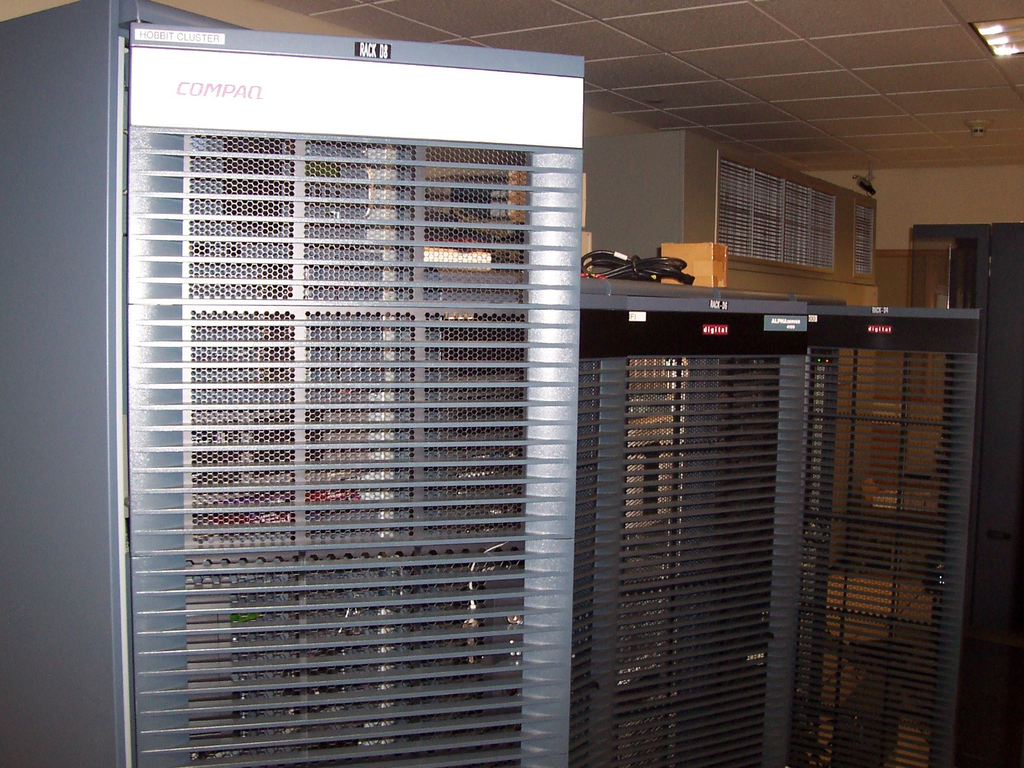
In early 2006, Marshall University laid out a plan to migrate HOBBIT (Figure 1), an HP OpenVMS cluster handling university-wide e-mail services. Plagued with increasing spam attacks, this cluster experienced severe performance degradation. Although our employee e-mail store was moved to Microsoft Exchange in recent years, e-mail routing, mailing list and student e-mail store (including IMAP and POP3 services) were still served by OpenVMS with about 30,000 active users. HOBBIT's e-mail software, PMDF, provided a rather limited feature set while charging a high licensing fee. A major bottleneck was discovered on its external disk storage system: the dated storage technology resulted in a limited disk I/O throughput (40MB/second at maximal) in an e-mail system doing intensive I/O operations.

Figure 1. HOBBIT OpenVMS Cluster Hardware

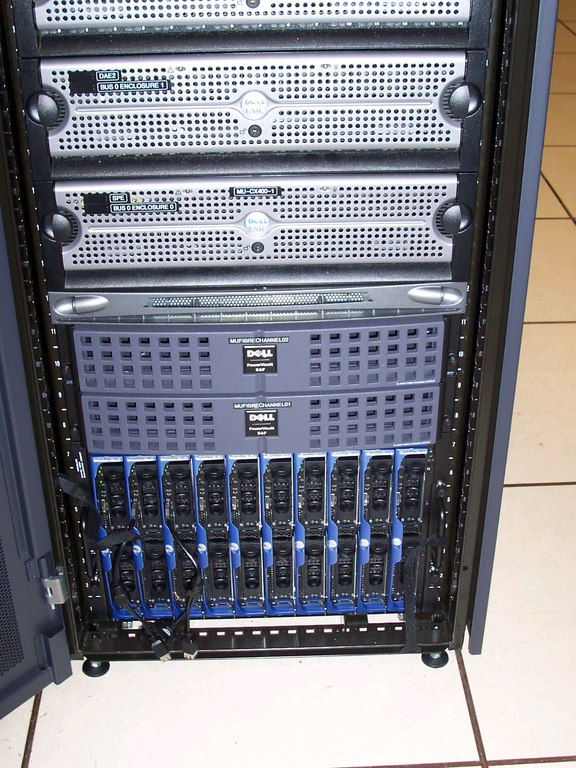
To resolve the existing e-mail performance issues, we conducted brainstorming sessions, requirements analysis, product comparison and test-lab prototyping. We then came up with the design of our new e-mail system: it is named MUMAIL (Figure 2) and uses standard open-source software (Postfix, Cyrus-IMAP and MySQL) installed on Red Hat Enterprise Linux. The core system consists of front-end e-mail hub and back-end e-mail store. The front-end e-mail hub uses two Dell blade servers running Postfix on Linux. Network load balancing is configured to distribute load between them. The back-end e-mail store consists of two additional blade servers running a Cyrus-IMAP aggregation setup. Each back-end node is then attached to a different storage group on the EMC Storage Area Network (SAN). A fifth blade server is designated as a master node to store centralized user e-mail settings. Furthermore, we use LDAP and Kerberos to integrate the e-mail user identities with Windows Active Directory (AD).

Figure 2. Linux E-Mail Server Blades and SAN

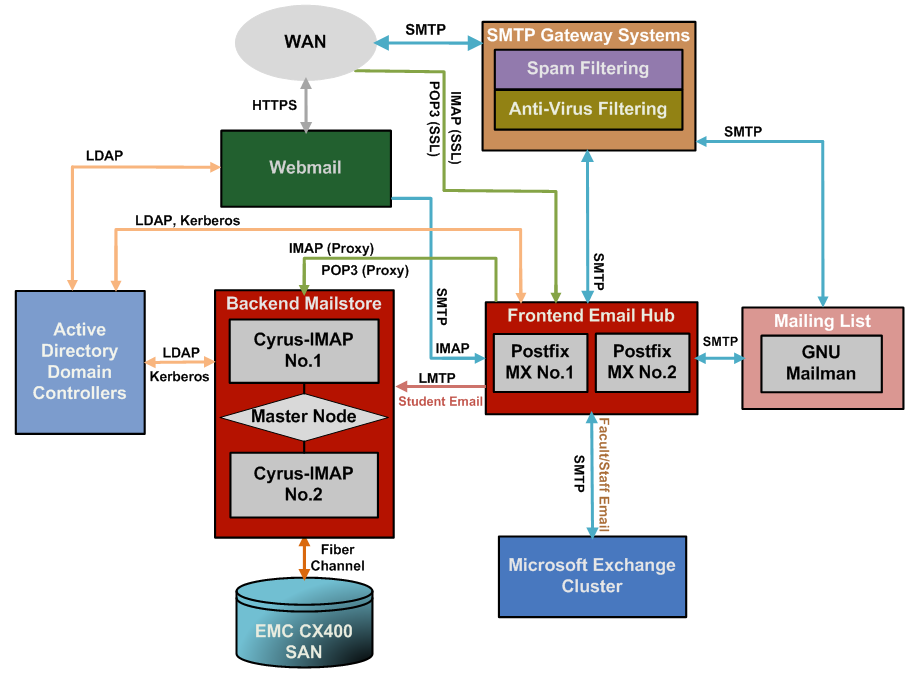
Figure 3 illustrates our new e-mail system architecture and the subsystem interactions with existing services, which include Webmail, AD and SMTP gateway. The block diagrams highlighted in red are the components to be studied in detail.

Figure 3. System Architecture

Related Solutions

Before we zoom further into our new e-mail system, I want to mention some of the existing Linux/UNIX e-mail solutions in higher-education environments. First, the HEC Montréal e-mail system discussed in a Linux Journal article (see Resources) influenced our design, which is based on Cyrus-IMAP and Postfix. Second, we looked into Cambridge University's solution. It uses custom IMAP proxy front-end servers and multiple pairs of Cyrus-IMAP mail store servers replicating data to each other. Furthermore, Carnegie Mellon University (CMU), which originally developed Cyrus-IMAP, uses Sendmail as the front-end mail exchanger and a Cyrus-IMAP Murder Aggregator setup on the back end. Columbia University moved its e-mail system to a Cyrus-IMAP-based solution in 2006, and the University of Indiana moved to Cyrus back in 2005. Cyrus and Postfix also are used by Stanford University.

Although the designs of these related solutions are different, most of them use a cluster-based approach that separates mail transport/delivery from the mail store. Multiple front-end MTA-MDA (Mail Transport Agent and Mail Delivery Agent) servers are set up to deliver mail to the back-end mail store, which then saves messages either in a filesystem (for example, Maildir) or a database. Most of the solutions use Cyrus-IMAP (on UNIX or Linux) as their mail store server.

Detailed Design

Some distinctive differences set our design apart from the existing solutions:

  1. Instead of using a separate directory service (such as OpenLDAP) for user authentication, our design integrates user identities with Windows Active Directory (AD).

  2. Rather than using an LDAP server to store user e-mail routing settings, we designed a relational database to store these settings.

  3. In the mail store setup, instead of using an active-passive high-availability cluster setup, like the HEC approach or the Cyrus replication approach developed at Cambridge, we deployed the Cyrus-Murder Aggregator. Unlike the CMU Cyrus Aggregator server allocation, which uses separate MTA server nodes, we consolidate both MTA and Cyrus Proxy functions to run on our front-end mail hub nodes.

We designed an e-mail user database (running MySQL on the Master node) to serve as a centralized data store for information including e-mail accounts, user e-mail routing, group aliases and mailing lists. Web-based user interfaces were developed using PHP to allow users to make changes to their settings in the database. Automated scripts running on the front-end nodes will query the database for user settings and build Postfix maps to apply these settings.

A Postfix server can be thought of as routers (not for IP packets but for e-mail). For each e-mail message, Postfix looks at the destination (envelope recipient) and the source (envelope sender) and then chooses how to route the e-mail message closer to its destination. Lookup tables called Maps (such as Transport, Virtual, Canonical and Alias Maps) are used to find the next-hop e-mail delivery location or apply e-mail address re-rewrites.

A background job is running on each of the front-end e-mail hub nodes to “pull” the e-mail settings (delivery location, e-mail alias and group alias information) stored in the e-mail user database to the Postfix maps (aliases, virtual, canonical and transport). Written in Perl, the program is configured to run periodically as a crond job.

Our design principle of the new e-mail system is to scale out from a single, monolithic architecture to multiple nodes sharing the same processing load. In a large e-mail environment, scaling out the front-end MTA system is considerably easier compared with scaling out the back-end mail store. As the front-end nodes are essentially data-less, using DNS or IP-based load balancing on multiple front-end servers is a typical practice. However, the same technique cannot be applied to design the back-end mail store where the user data resides. Without clustering, shared storage or additional software components (such as a proxy server), multiple mail store servers cannot share the same IMAP/POP3 process load under a unified service namespace. Because of this, using a single mail store server tends to be an obvious solution. However, one node usually implies elevated server hardware expenses when more powerful server hardware needs to be purchased to accommodate the ever-increasing system load. The price of a mid-range server with four CPUs is usually much higher than the total price of three or more entry-class servers. Furthermore, a single-node architecture reduces system scalability and creates a single point of failure.

The Cyrus-IMAP package is proven to be robust and suitable in large settings. It differs from other Maildir or mbox IMAP servers in that it is intended to run as a “sealed” mailbox server—the Cyrus mailbox database is stored in parts of the filesystem that are private to the Cyrus-IMAP system. More important, a multiple server setup using Cyrus Murder aggregation is supported. It scales out the system's load by using multiple front-end IMAP proxies to direct IMAP/POP3 traffic to multiple back-end mail store nodes. Although we found other ways to scale out Cyrus-IMAP—for example, Cambridge University's pair-wise replication approach, mentioned in the Related Solutions section of this article, or using a clustered filesystem to share IMAP storage partitions between multiple servers with products like Red Hat's Global File System (GFS)—compared with the aggregation approach, these solutions either are too customized to support (the Cambridge approach) or involve extra cost (GFS is sold separately by Red Hat, Inc.).

So, the Cyrus-IMAP Aggregation approach was adopted. Figure 4 illustrates the setup: two Cyrus back-end servers were set up, and each handles half the user population. Two Postfix MTA front-end nodes are designated to serve the proxy functions. When e-mail clients connect through SMTP/IMAP/POP3 to the front-end servers, the Cyrus Proxy service will communicate with the Cyrus Master node using the MUPDATE protocol, so that it gets the information about which Cyrus back-end node stores e-mail for the current client. Furthermore, the back-end Cyrus nodes will notify the Master node about the mailbox changes (creating, deleting and renaming mailboxes or IMAP folders) in order to keep the Master updated with the most current mailbox location information. The Master node replicates these changes to the front-end proxy nodes, which direct the incoming IMAP/POP3/LMTP traffic. The MUPDATE protocol is used to transmit mailbox location changes.

Figure 4. Cyrus-IMAP Aggregation Setup

Although it is not a fully redundant solution (the Master node is still a single point of failure), and half our users will suffer a usage outage if either one of the back-end nodes is down, the aggregator setup divides the IMAP processing load across multiple servers with each taking 50% of the load. As a result of this division of labor, the new mail store system is now scalable to multiple servers and is capable of handling a growing user population and increasing disk usage. More back-end Cyrus nodes can join with the aggregator to scale up the system.

Integration with Active Directory

One of the requirements of our new e-mail system is to integrate user identities with the university directory service. Because Microsoft Active Directory services have been made a standard within our centralized campus IT environment, Cyrus (IMAP/POP3) and Postfix (SMTP) are architected to obtain user authentication/authorization from AD. After the integration, all e-mail user credentials can be managed from AD. Most directory services are constructed based on LDAP. AD uses LDAP for authorization, and it has its own Kerberos implementation for authentication. The goal of an integrated AD authentication is to allow the Linux e-mail servers to use AD to verify user credentials. The technology used to support the AD integration scheme is based mainly on the Kerberos and LDAP support, which come with native Linux components, as shown in Figure 5.

Figure 5. Linux Authentication and Authorization Against AD

Here is how it works. First, we use AD Kerberos to authenticate Linux clients. Pluggable Authentication Module (PAM) is configured to get the user credentials and pass them to the pam_krb5 library, which is then used to authenticate users using the Linux Kerberos client connection to the Key Distribution Center (KDC) on Active Directory. This practice eliminates the need for authentication administration on the Linux side. However, with only the Kerberos integration, Linux has to store authorization data in the local /etc/passwd file. To avoid managing a separate user authorization list, LDAP is used to retrieve user authorization information from AD. The idea is to let authorization requests processed by Name Service Switch (NSS) first. NSS allows the replacement of many UNIX/Linux configuration files (such as /etc/passwd, /etc/group and /etc/hosts) with a centralized database or databases, and the mechanisms used to access those databases are configurable. NSS then uses the Name Service Caching Dæmon (NSCD) to improve query performance. (NSCD is a dæmon that provides a cache for the most common name service requests.) This can be very important when used against a large AD user container. Finally, NSS_LDAP is configured to serve as an LDAP client to connect to Active Directory to retrieve the authorization data from the AD users container. (NSS_LDAP, developed by PADL, is a set of C library extensions that allow LDAP directory servers to be used as a primary source of aliases, ethers, groups, hosts, networks, protocol, users, RPCs, services and shadow passwords.) Now, with authorization and authentication completely integrated with AD using both LDAP and Kerberos, no local user credentials need to be maintained.

In order to support LDAP authorization integration with Linux, Windows Server 2003 Release 2 (R2), which includes support for RFC 2307, is installed on each of the AD domain controllers. R2 introduces new LDAP attributes used to store UNIX or Linux user and group information. Without an extended AD LDAP schema, like the one used by R2, the Linux automatic authorization integration with AD is not possible. It is also important to mention that the SASL Authentication layer shown in Figure 3 is using Cyrus-SASL, which is distributed as a standard package by Carnegie Mellon University. The actual setup uses PAM for authenticating IMAP/POP3 users. It requires the use of a special Cyrus dæmon, saslauthd, which the SASL mechanism uses to communicate via a Linux-named socket.

Conclusion

Our new e-mail system is mostly based on open-source software. The incorporation of Postfix, Cyrus-IMAP and MySQL helped fulfill most of the system requirements. From the hardware perspective, the technologies used, such as Storage Area Network (SAN), blade server and the Intel x86_64 CPUs, helped to meet the requirements of fast access, system scalability and high availability. However, the use of open-source software and new hardware technologies may introduce new management overhead. Although all the open-source software packages used on the new system are mature products, compared with commercial software, they typically lack a GUI for system management. Their configuration and customization are completely based on a set of plain-text configuration files. Initially, this may present a learning curve, as the syntax of these configuration files must be studied. But, once the learning curve is passed, future management easily can be automated, as scripts can be written to manage the configuration parameters and store them in a centralized location. On the hardware side, complex settings also may imply complex network and server management settings, which also may introduce overhead during system management. However, the benefits of using the technologies discussed outweigh the complexities and learning curves involved. It is easy to overcome the drawbacks through proper design, configuration management and system automation.

At the time of this writing, our new Linux e-mail system (MUMAIL) has been running in production for ten months. The entire system has been running in a stable state with minimal downtime throughout this period. All user e-mail messages originally on HOBBIT were moved successfully to MUMAIL in a three-day migration window with automated and non-disruptive migration processes. Users now experience significantly faster IMAP/POP3 access speed. Their e-mail storage quota is raised from 20MB to 200MB, and there is potential to increase the quota to a higher number (1GB). With the installation of gateway-level spam/virus firewalls as well as increased hardware speed, no e-mail backlog has been experienced on MUMAIL during recent spam/virus outbreaks. With an Active Directory integrated user authentication setup, user passwords or other sensitive information are no longer stored on the e-mail system. This reduces user confusion and account administration overhead and increases network security. Mail store backup speed is improved significantly with faster disk access in the SAN environment. Finally, the new system has provided a hardware and software environment that supports future growth with the adoption of a scalable design. More server nodes—both front end and back end—and storage can be added when system usage grows in the future.